Add to Google Add to Bloglines Add to Newsgator Add to Yahoo! Contact ROI Revolution Sign Up for the ROI Newsletter Unofficial Google Analytics Blog Feed Unofficial Google Analytics Blog
Unofficial Google Analytics Blog by ROI Revolution

Categories Search This Blog Blogroll Archive

| |

May 29, 2008

Time on Page and Time on Site - How Confident Are You?

By Shawn Purtell, Google Analytics Support Tech
stopwatch.gif

Ah, Average Time on Page and Average Time on Site - what strange metrics. They sound so simple, but as I hope to point out in this article, both must be treated with caution. Due to the way Time on Page/Site are measured, there is a certain amount of error that goes along with them. Fortunately, there's a way to measure this error.

In the interest of getting to the point, I've provided two versions of this article. The first version is the short version. No proof, just the final answer. For those of you who demand proof (as I hope you do) - I've also provided the long version, with diagrams and Algebra and everything. Feel free to choose the version that suits you!

SHORT VERSION

Time on Page is more credible when a page has a lower Exit Rate, and Time on Site is more reliable when a source/medium/etc. has a lower Bounce Rate.

Confidence in Time on Page
Applies only to a page or group of pages

100% - Exit Rate

Example: The Exit % for my home page, /index.htm, is 30%, so confidence in Time on Page is 70%.

In other words, the Time on Page only applies to 70% of my home page views, and I know absolutely nothing about the other 30% - other than they all resulted in exits.

True Time on Site
Applies to any source, medium, campaign, keyword, ad, or user defined value

Average Time on Site / (1 - Bounce Rate)

Example: My AdWords traffic has a Bounce Rate of 40%, and Google Analytics has my Avg. Time on Site for AdWords as 00:01:00 (1 minute)

So:

True Time on Site is 1/(1-.40) = 1/.6 = 1.67 = 1m 40s

My True Time on Site is 1m 40s, which represents 60% of my AdWords traffic.

Also, the Time on Site is unknown for 40% of my AdWords traffic.

END OF SHORT VERSION

I don't expect anyone to take my word for any of this, and I love to talk about these kinds of things, so I've provided a longer version for those that might be interested in how I came to the above conclusions.

LONG VERSION

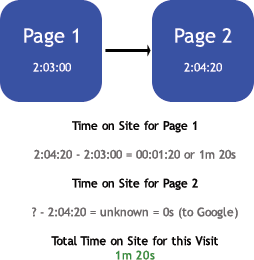
First things first - how is Time on Page measured in Google Analytics? I've created the following diagram to try and explain it:
2-page-visit.gif

Here's what happens in the above two-page visit. The visitor comes to Page 1 and the timestamp is registered. If the visitor then goes to Page 2, another timestamp is registered. Google can then take the difference of those two timestamps and come up with a Time on Page for Page 1.

Looking at Page 2 however, there is no timestamp for the next page, so Google Analytics is not able to calculate a time on page for Page 2.

What does this mean?

It means that if the page is an exit page for a specific visit, Time on Page is not calculated.

This makes sense, but it also means that you only have time data for (1 - Exit Rate) percent of pageviews.

So if the Exit Rate for a page is 40%, then the Time on Page metric only applies to 60% of pageviews.

Conclusion: The lower a page's Exit Rate, the more confident you can be in the Time on Page metric for that page.

How about Time on Site?

Time on Site is a little different, because instead of pageviews, it relies on visits. Since every single visit has an exit, you can't use Exit Rate when looking at your confidence level.

Time on Site is calculated by taking the timestamp of the final page of the visit (the Exit Page), and subtracting the timestamp of the first page.

So if I enter the site at 2pm and I start to view my last page at 2:10pm, Google Analytics will record my Time on Site as 10 minutes. Keep in mind that this time ignores the amount of time spent on the last page of my visit.

Which brings us to point #1:
Time on Site does not include time spent on the final page of a visit.

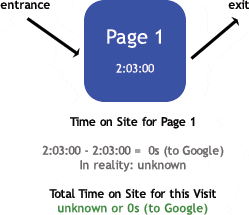
There is one special case which causes an additional problem. For a single-page visit (a bounce), the entrance page is also the exit page. This means that the Time on Site will be zero:

1-page-visit.gif

Which brings us to point #2:
Time on Site factors in a 0 for every bounce, even though Time on Site for bounces is unknown!

This means that confidence in Avg. Time on Site is related to Bounce Rate.

Not being the kind of person who is content with that conclusion, I brought some Algebra into the discussion. For those of you who hate Algebra, the conclusion is that

True Time on Site = Average Time on Site / (1 - Bounce Rate)

*Note that Bounce Rate here refers to the decimal value (i.e 40% = 0.40)

So for AdWords, if my Avg. Time on Site is 1m, and the Bounce Rate from Google Analytics is 40%, then

True Time on Site = 1/(1-0.4) = 1/0.6 = 1.67m = 1m 40s

Therefore, for AdWords Traffic, I know that non-bouncers spent an average of 1m 40s on the site. For the 40% of the traffic that bounced, I have absolutely no idea.

As my bounce rate gets lower, the Avg. Time on Site becomes much closer to the actual time spent on the site by all of my visitors.


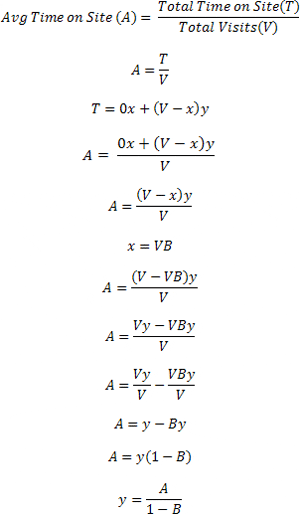
Here's my entire thought process using Algebra:

In the below set of equations,


  • x is the number of visits that were bounces

  • y is the amount of time spent on the site by people who didn't bounce

  • B is the Bounce Rate

  • V is the number of Visits

  • A is the Avg. Time on Site found in Google Analytics

  • T is the Total Time on Site for all Visits


time-on-site-algebra.gif

Well, there it is. Take your Time on Page and Time on Site with a grain of salt. Time on Page is more reliable with a lower Exit Rate, and Time on Site is more reliable with a lower Bounce Rate.

Posted by Shawn Purtell at 4:04 AM


Filed under: , ,

TrackBack

TrackBack URL for this entry:
/mt/mt-tb.cgi/301.

Comments

Shawn this is some excellent thinking and analysis and it brings up very important points regarding Google Analytics that many don't seem to realize.

I myself have tried many times to explain these points to clients, etc., and it seems to be something most people have never realized. I find many business owners and people who are tasked with studying this data take what they see in GA as fact and don't use reasoning such as this.

Well done!

Posted by: Jesse DaCosta at May 30, 2008 2:04 PM

Good post.

I knew about Time on page, but I never give any thought to Time on site.

Thank!

Posted by: Sebastien Brodeur at May 30, 2008 3:13 PM

Hi,

great post but just wonder if Google isn't doing all these calculations already.

I would kind of expect them to be smart enough and apply all the algebra you talk about.

Thanks

Posted by: Claudiu Murariu at June 2, 2008 3:24 AM

@Jesse:

Thanks for the compliment! I also think it's important that users know what metrics actually represent. It's not that the metrics aren't useful - they are - but as with any web analytics platform, it's more important to focus on trends than accuracy. Thanks for reading!

Posted by: Shawn Purtell, Google Analytics Support Tech Author Profile Page at June 2, 2008 7:46 AM

@Sebastien:

Thanks for the compliment, and thanks for reading!

Posted by: Shawn Purtell, Google Analytics Support Tech Author Profile Page at June 2, 2008 7:47 AM

@Claudiu:

Google isn't doing these calculations already (we've tested these metrics), although I'm sure they are aware of the limitations of Time on Site and Time on Page. Google (or rather the people there) are definitely smart, but there are still some limitations to the way that data is collected for any web analytics platform. Time on Site and Time on Page are useful, but I think it's important that users know these metrics, just like most other web metrics, aren't 100% accurate.

They instead provide useful benchmarks that you can use to measure trends in your data. This is much more important than accuracy, and can be said of just about every single metric within Google Analytics.

Posted by: Shawn Purtell, Google Analytics Support Tech Author Profile Page at June 2, 2008 8:01 AM

Hi, regarding "time on page" one question... do you know how we can see the difference between "new visitors" and "returning visitors". Thanks a lot

Posted by: Daniele Bianda at June 4, 2008 5:34 AM

@Daniele:

Time on Page only makes sense when you're looking at metrics for a specific page. So you would have to first pick a page you want to measure, which you find in the Top Content report. Once you've found the page you're looking for, you can click on the page name to drill down. Once you've drilled down, you can then segment by Visitor Type to see the Time on Page for New vs. Returning Visitors.

You can, however, see Time on Site pretty easily, by using the New vs. Returning report found under the Visitors section.

Hope that helps!

Posted by: Shawn Purtell, Google Analytics Support Tech Author Profile Page at June 4, 2008 8:23 AM

Hi Shawn, thanks a lot for your explanation, we found this option, but the problem when you segment by "Visitor Type" is that you have the "Avg. Time on Site" and not "Avg. Time on Page" (It seems a missing option in Google Analytics). Thanks a lot

Posted by: Daniele at June 6, 2008 2:38 AM

@Daniele:

Ah - I see what you mean. You can sidestep this limitation by simply creating a profile that only includes new visitors (or returning visitors). You can do this with a custom include filter, using 'Visitor Type' and either 'new' or 'returning' as the filter pattern.

This way, when you look at the content reports in one of these new profiles, the Time on Page will only apply to New or Returning Visitors, but not both. Hope that helps!

Posted by: Shawn Purtell, Google Analytics Support Tech Author Profile Page at June 6, 2008 8:06 AM

Thanks a lot Shawn

Posted by: Daniele at June 9, 2008 8:07 AM

Great article. As a video streaming site, we have noticed a huge difference between our StatCounter numbers and our Google Analytics numbers. If someone watches a 30 minute video on our site, it can throw off the Google Analytics if they exit off that page. Anybody running a video streaming site needs to note the differences cmopared to text based sites.

Posted by: Chris Moise at June 14, 2008 5:20 PM

This is some interesting analysis of the metric and makes perfect sense. Very good post.

I like to combine this analysis with pages per visit, especially with sites that have a lot of pages, like large retail e-commerce sites. I think this helps give a full picture of level of engagement a user has with a web site.

Posted by: Andy at June 14, 2008 6:09 PM

@Chris:

Another good thing to keep in mind is that you can extend the timeout if you need to - which is important if you have pages that users can spend 30 minutes on. You can get the official instructions here, but basically it involves adding a single line to your Google Analytics tracking code on those pages. Thanks for reading!

Posted by: Shawn Purtell, Google Analytics Support Tech Author Profile Page at June 16, 2008 8:20 AM

@Andy:

I agree, and there are additional ways to measure user engagement. My personal favorite is by using qualitative data (surveys and usability tests) and heat maps to find out if and how users are finding what they need. Thanks for reading!

Posted by: Shawn Purtell, Google Analytics Support Tech Author Profile Page at June 16, 2008 8:29 AM

Interesting. I'd heard of bounce rates being measured, but it makes sense if time on site is being measured too.

As you pointed out, it's difficult to work out if no Google-based tracking (Analytics) is installed on the site, and the user doesn't return back to Google for another search.

Interesting concept!

Posted by: Adwords Monitor at June 17, 2008 7:50 AM

Post Your Comments

Post a comment

Contacting ROI Revolution

Contact Us

Address:
3109 Poplarwood Ct.
Suite 219
Raleigh, NC 27604


Authorized Google Analytics Consultant

Google Analytics Certified Service and Support Consultant


Free Webinar!

Join a Live FREE Google Analytics Training Webinar
Register now to learn how to
turn Google Analytics into
pure profit! You'll learn how to use many of the key reports, a ten-step system for properly configuring Google Analytics on your website, and how to apply what you learn to the attainment of your online goals. Register for our free Google Analytics training webinar today.


Subscribe to the
ROI Revolution Google
Analytics Newsletter today

Free monthly email publication that contains valuable, practical tips, secrets, and much more! Subscribe to our free Google Analytics newsletter today.


Looking to Purchase
Urchin 5 Software or Fee
Based Support?

We are a Urchin software certified service and support partner! Buy Urchin 5 software, profile packs, load balancing modules, campaign tracking, or fee-based support today.